Tiny goblin.
Big macro.
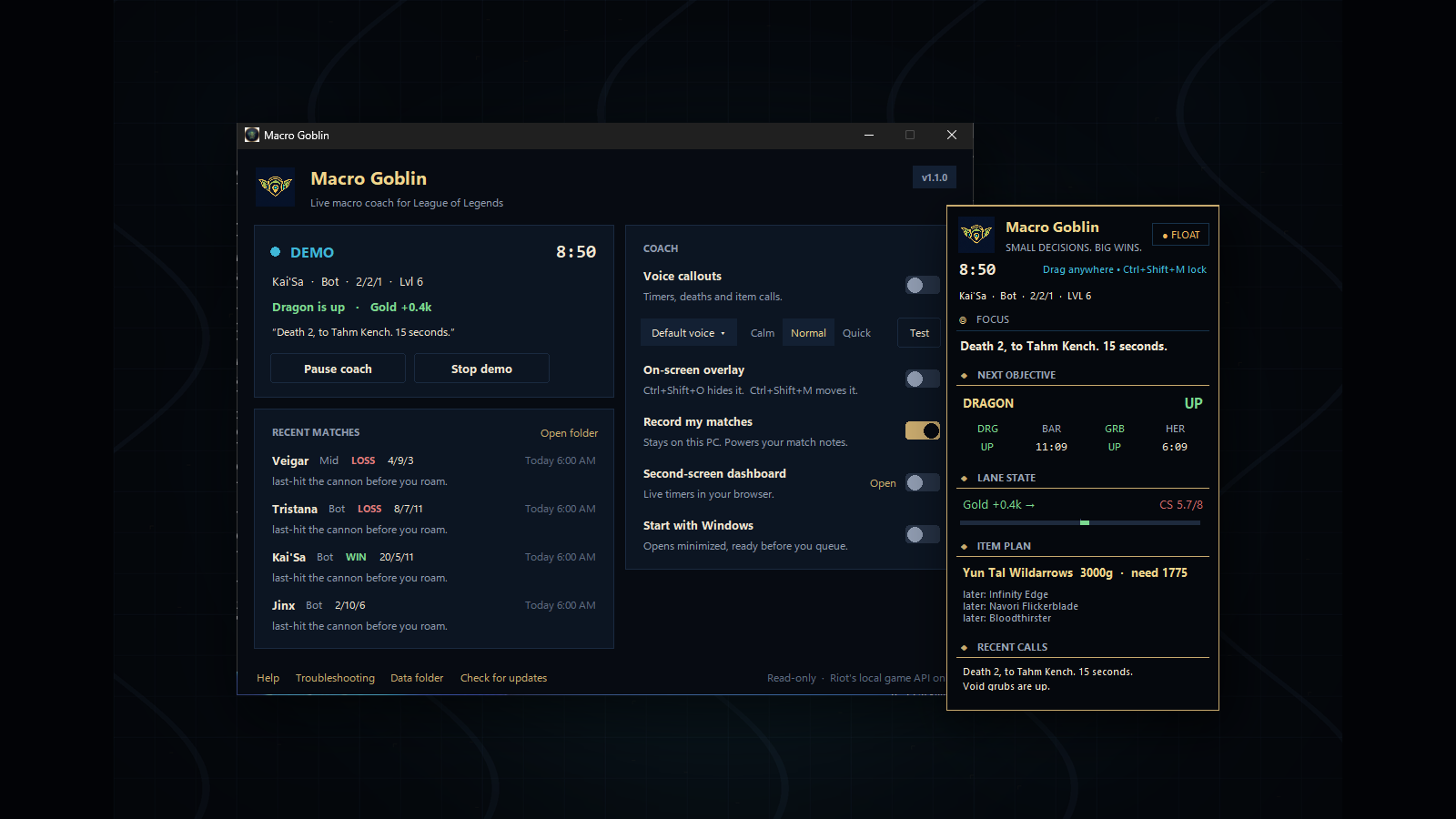
A live coach in your ear and on your screen: objective timers, the dragon race, item counters, CS pace and death patterns, called at the moment they matter.
Not another mystery overlay.
Macro Goblin is intentionally boring under the hood: Python stdlib, Riot's local Live Client Data API, Riot Data Dragon, and a separate click-through OS window. The default mode is deterministic logic — no LLM required.
One focus line, next objective, lane state, and item path. It is built for glances, not dashboard cosplay.
Captures, logs, and reports stay on disk and are gitignored by default.
No process memory, DLL injection, DirectX hooks, packet sniffing, or gameplay input automation.
What it tells you.
- Studio voice. A natural neural voice that runs offline on your PC. No account, no subscription.
- Beginner, Standard or Pro. New players hear why a call matters. Experienced players hear only what changes a decision.
- Report card. Farming, fighting, survival, vision and objectives graded after every game, with trends across your last 20.
- Back timing. "Dragon in 90. You have 1400 gold. Good time to back and shop."
- Objective timers. Dragon, grubs, Herald, Baron and Elder at 60 and 30 seconds, with respawns after every kill.
- The dragon race. "Dragons 2 to 1." Soul and Elder calls only when one team actually gets there.
- Deaths that teach. Who got you, your timer, and a callout when the same champion keeps winning the fight.
- Your lane. Level 6 for you and your opponent, CS pace when you fall behind, and gold burning in your pocket.
- Their spikes. Finished items from your lane opponent and their fed carry.
- Item counters. Anti-heal, armor and magic pen, and the right boots for their comp.
- Match notes. After every game: deaths, CS at 10/15/20, objectives, and one thing to fix next time.
- Quiet by design. Urgent calls first. Routine updates stay on the overlay, and late lines are dropped instead of spoken.
Install in a minute.
Download, run, done. Adds a Start menu shortcut and an uninstaller.
Download SetupDownloads the latest release, checks its SHA-256, installs it for you.
irm https://atxgreene.github.io/rift-coach/install.ps1 | iex"Windows protected your PC"? Macro Goblin is new and not code-signed yet, so SmartScreen asks once. Click More info > Run anyway. Every download has a SHA-256 checksum on the release page.
Run from source instead (Python 3.9+)
git clone https://github.com/atxgreene/rift-coach.git
cd rift-coach
python app.py            # the app window
python lol_coach.py --demo --speed 20   # command line demo
Safety posture
Macro Goblin reads the local Live Client endpoint available during a match and static Data Dragon metadata. The overlay is a normal topmost OS window. The web dashboard binds to localhost only.
Queue with the goblin.
Install it once, leave it open, and queue. It speaks up when it matters and stays out of the way when it doesn't.